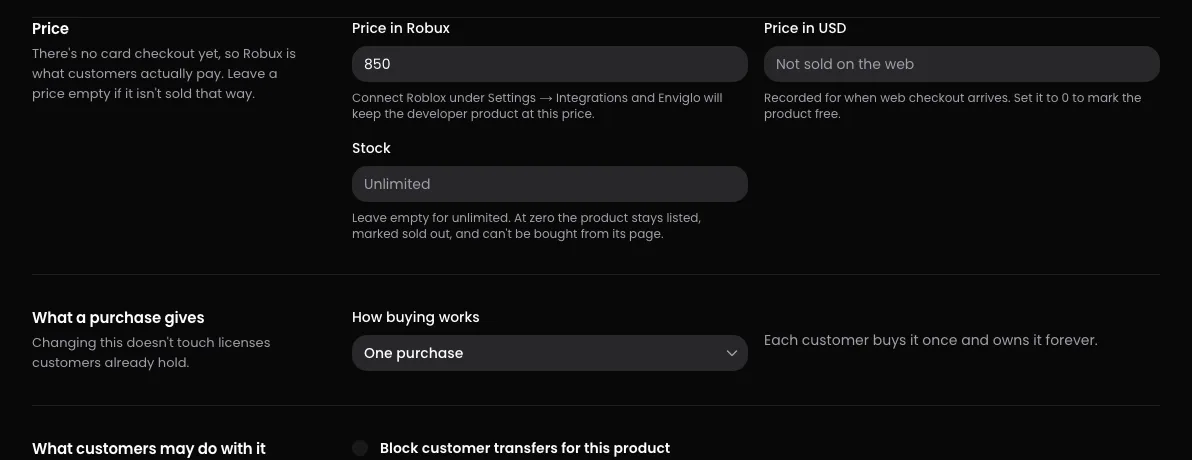
The Pricing page sets what a product costs, how many can be sold, and what someone gets each time they buy it. You need the Prices and sales permission.
To get there: in your store's dashboard, open Products, pick the product, then open Pricing.
What's included: puts other products inside this one to make a bundle, and shows what they'd cost bought separately. A bundle is priced like any other product. See .
Sale and What's included have their own buttons. The last four sections save together: change something and a bar appears at the bottom, then press Save pricing.
How people pay
Products are bought with Robux on Roblox: through a developer product in your game, or a game pass bought on Roblox. Free products are claimed on the website.
Price in Robux is what buyers pay. It's a whole number of Robux. Leave it empty if the product isn't sold on Roblox.
How it reaches Roblox depends on whether your store's Roblox experience is connected under Settings, then Integrations:
Connected: saving a Robux price creates a developer product for this product the first time and fills in its ID under Bought on Roblox. After that, changing the price here changes it on Roblox. The confirmation tells you, for example "Pricing saved, and created on Roblox at 500 Robux."
Not connected: create the developer product or game pass on Roblox yourself, set its price there, and paste its ID under Bought on Roblox. Enviglo reads the price from Roblox.
Game passes: their price always comes from Roblox. Change it there.
The price on Roblox is the one buyers actually pay, so Enviglo keeps reading it back: after every save, and again once it's a few days old. If you've just changed something on Roblox, press Check Roblox on Delivery to read it straight away.
Make a product free
Under Price, press Make it free.
Press Make it free again to confirm.
The product page then shows Free and a Get it free button. Anyone signed in can add it to their library, once. Free products show up under the Free filter in browse, and in your in-game hub. Someone whose license you revoked can't claim it again.
If a developer product or game pass was linked, the product stops being sold through it and comes out of your in-game hub. It stays on Roblox untouched. To sell the product again, press Charge for it.
The Price in USD field
Price in USD is for paying by card on Enviglo. It's locked until your store's payout account, under Settings, then Payouts, is set up and Stripe has verified it. A price saved there before then isn't shown to buyers.
Limit stock
Stock is empty by default, which means unlimited. Type a whole number to limit it.
When stock is set, the product page shows how many are left.
Each purchase recorded from Roblox counts it down by one. Codes and grants from your dashboard don't.
At zero, the product stays listed. Its page shows Out of stock, Buy on Roblox gives way to Sold out, and it's flagged Sold out under Needs attention on your Products list.
Stock never refuses a purchase your game reports, because the player has already paid by then. If your game sells the product itself, check the stock before you prompt: see Sell with developer products.
To sell more, raise the number or clear the field for unlimited. Your own tools can also change stock through the API; see the API reference.
Off-sale
Off-sale is decided on Roblox, and there's no switch for it on this page. If Roblox reports the developer product or game pass as not for sale, the product page shows Off-sale on Roblox instead of a buy button, and the product is flagged under Needs attention.
To sell it again, put it back on sale on Roblox, then press Check Roblox on Delivery. To stop selling a product on Enviglo, unpublish or archive it instead. See Drafts, published and deleted products.
What a purchase gives
Choose a license type under How buying works. Changing it doesn't touch licenses customers already hold.
License type
What the site says
Buying again
One purchase
Each customer buys it once and owns it forever.
Adds nothing. The payment is still recorded.
Buy more than once
Every purchase adds a copy, e.g. a license per game or a consumable.
Adds another copy, which is a license of its own.
Subscription
Every purchase adds a set number of days of access; it stops working when the time runs out.
Adds more days.
Whatever the type, if someone's license was revoked or given away, buying again gives them a new license. Redeeming a code follows the same rules as buying.
A game pass can only be bought once per person on Roblox, so a product sold as a game pass must use One purchase.
What "per copy" means
With Buy more than once, the product page shows the price followed by "per copy · buy as many as you need". Each purchase is one copy, and each copy is a license of its own. It suits things people need several of, like a license per game.
Choosing Subscription shows Days per purchase. It starts at 30 and can be 1 to 3,650. Each purchase adds that many days, counted from the current end if it hasn't passed yet, or from the moment of purchase if it has.
The product page shows the price "per 30 days of access", using your number.
Owners see when their access ends, and Enviglo reminds them 3 days before.
When the time runs out, access stops: no downloads, games no longer count the license, and the product's Discord role is removed. Buying again brings it back.
What customers may do with it
Both switches can only narrow what your store already allows.
Block customer transfers for this product. If your store lets customers hand licenses to each other, ticking this exempts this product. Store staff can still move a license from Customers. The store-wide setting is the Let customers transfer licenses switch, under Settings, then Selling, in What customers can do. See Give a license to someone else and Give, revoke, restore and transfer licenses.
Take commission requests for this product. People who own the product see Request a commission on its page. Requests arrive under Orders, and you agree the price in the conversation. This only works while Take custom work is on for the whole store, in the same What customers can do section. See Handle service requests.
Troubleshooting
"Game passes can only be bought once on Roblox. Use a developer product for this kind of license." The product has a game pass, so it must stay One purchase.
"Give each purchase at least one day."Days per purchase can't be 0.
"Pricing saved, but Roblox wasn't updated:" followed by a reason. Your changes are saved on Enviglo, but Roblox didn't take them. Check the connection under Settings, then Integrations, and save again.
The Robux price changed back after saving. Enviglo reads prices from Roblox. If your store isn't connected, or the product is sold as a game pass, change the price on Roblox.
The price shown is lower than your normal price. A sale is running, and Price in Robux shows the sale price. Your normal price comes back when the sale ends. See Discounts and sales.
A product says "Not available to buy yet". Nothing sells it: no developer product or game pass is linked under Bought on Roblox, and it isn't free. Link one, or press Make it free.