Drafts, published and deleted products
Saved Sep 20, 2026 by @enviglo: Screenshots for the hub, keys, pricing, products and licenses
Changes from the version before
Every product has a status. It decides who can see the product and whether it's on sale. This guide explains each status, the **Needs attention** list, and how to move a product from one to another.+ 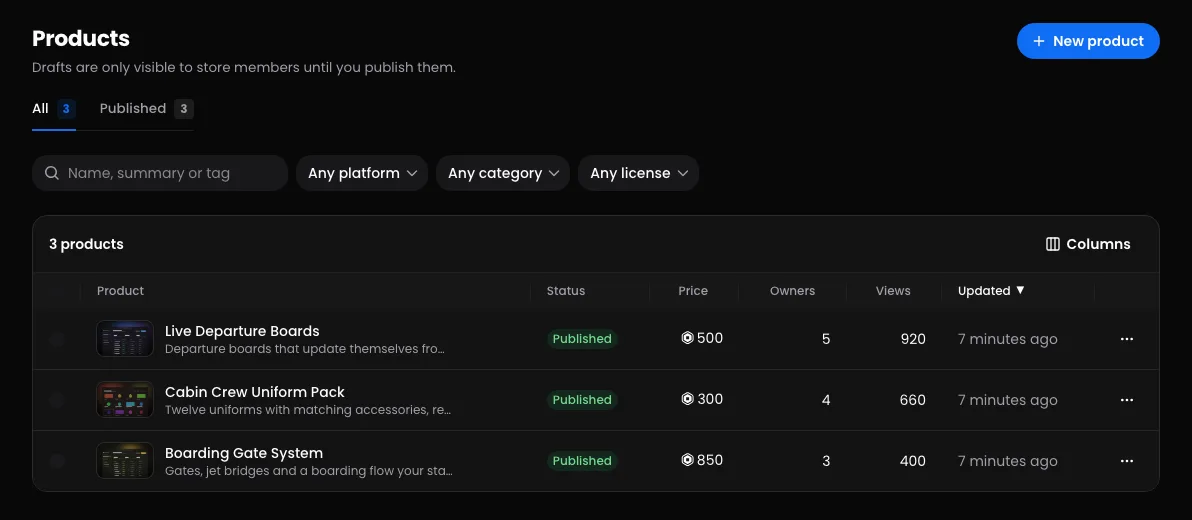+## The statuses| Status | Who can see it | Listed for sale | People who own it |…
This version
Every product has a status. It decides who can see the product and whether it's on sale. This guide explains each status, the Needs attention list, and how to move a product from one to another.

The statuses
| Status | Who can see it | Listed for sale | People who own it |
|---|---|---|---|
| Draft | Your team | No | Keep it, and can download it |
| Published | Everyone, on your storefront and the marketplace | Yes | Keep it |
| Archived | Your team | No | Keep it, and can download it |
| Suspended | Your team; hidden from everyone else | No | Keep it, but downloads are paused |
| Deleted | Nobody, not even your team | No | Keep it, and can download it from their library |
You'll find a product's status at the top of its pages. On your Products list, tabs sort products by status: All, plus Needs attention, Published, Drafts, Archived and Suspended whenever there's something in them. Your sidebar links to the main views under Products.
Drafts
Every new product starts as a draft. Only your team (and Enviglo staff) can open it, using Preview. The exception is a draft you've announced as an upcoming drop, whose page is public until it opens.
Publish it once its checklist is complete, or book it to publish itself with Schedule a drop. See Create and publish a product. On your Products list, a complete draft is tagged Ready to publish, and a booked one Publishing soon.
Published
A published product is on your storefront and across the marketplace. A published product with no image of its own is listed with a cover Enviglo draws for it, behind products that have a picture.
To take it down, press Unpublish to make it a draft again, or Archive.
Needs attention
Open Products, then Needs attention, to see products that are listed but can't be bought, or aren't selling as well as they could. Each one carries tags in the list. Point at a tag to read more.
| Tag | What it means | What to do |
|---|---|---|
| Off-sale on Roblox | Roblox reports the developer product or game pass as not for sale, so the buy button can't do anything. | Put it back on sale on Roblox, then press Check Roblox on Delivery. Or take the product down. |
| No way to buy | It isn't free and has no developer product or game pass. | Link one on Delivery, or make it free on Pricing. |
| Sold out | Its stock is zero. This one counts for drafts too. | Raise the stock, or clear it for unlimited, on Pricing. |
| No artwork | It's listed with a cover Enviglo drew, behind every product with a picture of its own. | Add an image on Media. |
| No summary | Cards and search results have nothing to show under the name. | Add one on Details. |
Three more tags are for information only and don't put a product on this list: On sale, Publishing soon and Ready to publish.
When everything's fine, the list says "Nothing needs attention." See Pricing and license types and Delivery on Roblox and Discord for more on selling problems.
Change a product's status
Publishing, unpublishing, archiving and scheduling need the Publish products permission. There are three places to do it:
- The Status box on a product's Overview or Details page: Publish, Unpublish, Archive, Restore and publish or Schedule a drop, depending on its status.
- The menu at the end of a product's row on your Products list: Publish, Unpublish or Archive.
- Several at once: tick products on your Products list, then press Publish, Draft or Archive in the bar at the bottom. Up to 250 products at a time. Any that can't change are skipped and named, with the reason, such as "already published" or what it still needs.
Archive a product
Archive a product you've stopped selling but want to keep. It's hidden from everyone outside your team, and owners keep their licenses and downloads.
- Archived products still count towards your plan's product limit.
- Codes for an archived product stop working until it's published again.
To bring one back, press Restore and publish in its Status box, which needs the publishing checklist complete. To bring it back as a draft instead, tick it on your Products list and press Draft in the bar at the bottom.
Delete a product
Deleting needs the Delete products permission.
- In your store's dashboard, open Products, pick the product, then open Details.
- At the bottom, under Delete this product, press Delete product.
- Read the confirmation, then press Delete product again.
To delete several, tick them on your Products list and press Delete in the bar at the bottom.
What happens depends on whether anyone has ever had a license for it, including one that was later revoked:
- If so, the product comes off your store and out of your dashboard, but everyone who owns it keeps it. Their license, purchase record and downloads all stay, and their library marks it No longer sold.
- If not, it's removed for good, along with its images, files and reviews.
You can't undo a delete. A few other things to know:
- A deleted product no longer counts towards your plan's product limit.
- A drop booked for it is cancelled.
- A deleted product that people own keeps its developer product and game pass IDs, so games that check ownership keep working. Those IDs can't be used on another product in your store.
- Deleting doesn't change anything on Roblox. If your game still offers the developer product, take it off sale on Roblox.
Suspended by Enviglo
The Enviglo team can suspend a product that breaks the rules. It's hidden everywhere until they restore it.
- Its Status box says it was suspended by Enviglo, shows the Reason, and links to Notices and appeals.
- You can't publish, unpublish, archive or delete it.
- Owners keep their licenses, but can't download it while it's suspended.
- It's listed under Suspended products on your store's Notices page, with an Appeal link that opens a support ticket.
See Notices from Enviglo.
Common questions
Does unpublishing or archiving affect people who own it? No. They keep their license, and can still download it from their library.
Will republishing make it New again? No. The New label counts from the first time a product was published.
Why can't anyone see my published products? Check whether your store is paused. While it is, none of its products show publicly, and previews say "This store is paused". Owners and admins reopen it under Settings, then Store. See Store settings.
Why was deleting refused? A suspended product can't be deleted: "Enviglo suspended this product, so it can't be deleted while that's being looked at. Contact support if you think it's wrong."