API keys
Saved Sep 20, 2026 by @enviglo: Screenshots for the hub, keys, pricing, products and licenses
Changes from the version before
- You need the **Integrations** permission. Owners and admins have it; staff need it given to them. See [Roles and permissions](/wiki/roles-and-permissions).- A key belongs to one store and only ever sees that store. Each store you run needs its own.+ 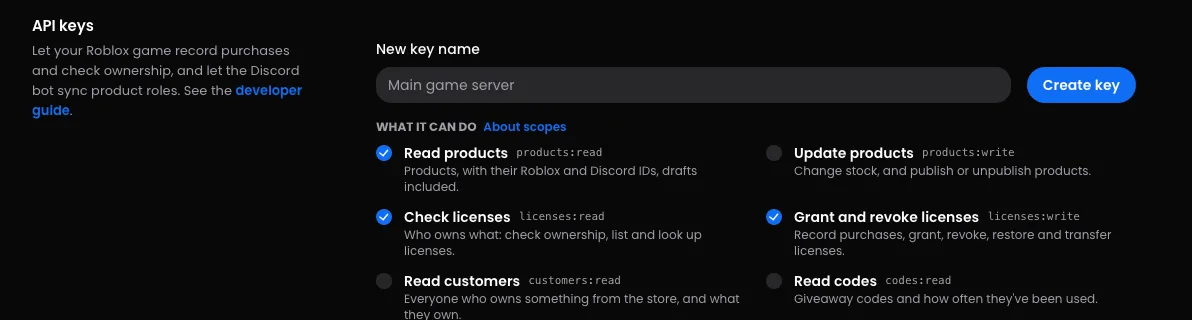+## Create a key1. In your store's dashboard, open **Settings** → **Integrations**.…
This version
An API key lets your Roblox game, Discord bot or server talk to Enviglo on your store's behalf: recording purchases, checking licenses and more. This guide covers making a key, choosing what it can do, and keeping it safe. For your first request with one, see Make your first API call.
Before you start
- You need the Integrations permission. Owners and admins have it; staff need it given to them. See Roles and permissions.
- A key belongs to one store and only ever sees that store. Each store you run needs its own.

Create a key
- In your store's dashboard, open Settings → Integrations.
- In the API keys card, type a New key name that says where it'll be used, like "Main game server". It needs at least two characters.
- Under What it can do, tick the scopes it needs. See Scopes.
- Press Create key.
- Your new key appears in a box at the top of the card. Press Copy, store it somewhere safe, then press Done.
This is the only time Enviglo shows the key. Enviglo keeps only a hash of it, so nobody can read the key back later, including you. If you lose it, make a new key and revoke the old one.
Keys start with evg_live_. Under the list, the card shows the base URL for your store's API.
Scopes
A key can only do what its scopes allow. You can't change a key's scopes after making it: make a new key instead.
| Scope | In the dashboard | What it allows | Who can add it |
|---|---|---|---|
products:read | Read products | Products, with their Roblox and Discord IDs, drafts included. | Anyone who can make keys. On new keys. |
products:write | Update products | Change stock, and publish or unpublish products. | Needs Edit products and Publish products. |
licenses:read | Check licenses | Who owns what: check ownership, list and look up licenses. | Anyone who can make keys. On new keys. |
licenses:write | Grant and revoke licenses | Record purchases, grant, revoke, restore and transfer licenses. | Needs Grant licenses, Revoke licenses and Transfer licenses. On new keys. |
customers:read | Read customers | Everyone who owns something from the store, and what they own. | Needs See sales and customers. |
codes:read | Read codes | Giveaway codes and how often they've been used. | Needs Giveaway codes. |
codes:write | Manage codes | Make giveaway codes, and switch them off or delete them. | Needs Giveaway codes. |
requests:read | Read requests | Services, and the requests customers send, with their answers and quotes. | Needs Handle requests. |
stats:read | Read stats | Sales, customers and followers over time. | Needs See sales and customers. |
discord:read | Discord entitlements | Which product roles a Discord member should have. | Anyone who can make keys. On new keys. |
A new key starts with the four marked "On new keys" ticked: what a Roblox game or a Discord bot needs. If you untick everything, the key gets whichever of those four you're allowed to give.
A key can't do more than the person who made it. Scopes that need permissions you don't have are greyed out with "Needs permissions you don't have."
Give each key only what its job needs:
- A Roblox game that sells developer products or game passes needs Grant and revoke licenses. Add Check licenses to check ownership, and Read products to list products.
- A Discord bot that hands out product roles needs Discord entitlements.
- Your own tools need whichever of the rest they use.
The API reference lists the scopes too, and each endpoint there names the one it needs.
Plan limits
How many working keys a store can have depends on its plan:
| Plan | API keys |
|---|---|
| Free | 2 |
| Pro | 10 |
| Ultimate | 25 |
Revoked keys stay in the list for the record but don't count, and neither does the in-game hub's key. When you're at the limit, Enviglo says so, for example "Your plan covers 2 API keys. Pro raises that to 10." You can see how many you're using under Settings → Selling. See Plans, limits and fees.
Revoke a key
- In the API keys card, press the bin button next to the key.
- Press Revoke to confirm.
Anything using the key stops working immediately, and its requests get 401 "Invalid or revoked API key." You can't undo this: make a new key if you need one. The key stays in the list, marked Revoked.
Each key in the list shows the start of the key, its scopes, when it was made and when it was last used, so you can spot keys nothing uses any more. Making and revoking keys shows in your store's Audit log.
Keep keys safe
Anyone with a key can act for your store, within its scopes.
- Keep keys on servers: your game's server scripts, your bot, your backend.
- In Roblox, keep the key in a Script in ServerScriptService, or a module in ServerStorage. Never put it in a LocalScript or ReplicatedStorage, which reach players' devices.
- Don't make a place with a key in it copyable, or share its file.
- Never put a key in a web page or a public repository.
- If a key gets out, revoke it straight away and make a new one.
Roblox Secrets
Roblox can store the key for you, so it isn't in any script at all:
- In Creator Hub, open your experience's Secrets and add one named
enviglo_api_key, with your key as its value andenviglo.comas its domain. - To test in Studio, add the same secret under Game Settings → Security → Secrets.
- Read it with
HttpService:GetSecret, and add it to your request's headers:
-- A server Script. The key comes from the experience's Secrets, not from the script.
local HttpService = game:GetService("HttpService")

local found, secret = pcall(function()
	return HttpService:GetSecret("enviglo_api_key")
end)
if not found then
	warn("Add a secret named enviglo_api_key to this experience's Secrets:", secret)
	return
end

local sent, response = pcall(function()
	return HttpService:RequestAsync({
		Url = "https://enviglo.com/api/v1/store",
		Method = "GET",
		Headers = { ["Authorization"] = secret:AddPrefix("Bearer ") },
	})
end)
if sent then
	print("Enviglo answered HTTP " .. response.StatusCode)
end
Hub keys are separate
The in-game hub has its own key, built into the hub game you download. It isn't listed under API keys, doesn't count towards your plan's keys, and has no API scopes, so it can't record purchases or check licenses through the API. To replace it, download the hub again. See Set up the in-game hub.
If your store came from myPod, you may see a key named myPod hub key in the list. It's the key your old in-game hub uses, and revoking it stops that hub.
Troubleshooting
- A message like "You can't give a key read customers: it needs permissions you don't have." You ticked a scope that needs a permission you don't hold. Untick it, or ask an owner or admin to make the key.
- A message like "Your plan covers 2 API keys. Pro raises that to 10." You're at your plan's limit. Revoke a key you no longer use, or move to a bigger plan.
- Requests get 401 "Invalid or revoked API key." The key was mistyped or revoked.
- Requests get 403, like "This key does not have the licenses:write scope." Make a new key with that scope.
- You can't see the API keys card. You need the Integrations permission.